Gosund SP111
Warning
 Looks like device chip was replaced to non-flashable custom tasmota chip.
Please be aware, that there is a new version of that outlet, often having the phrase
Looks like device chip was replaced to non-flashable custom tasmota chip.
Please be aware, that there is a new version of that outlet, often having the phrase EP2 instead or in addition to SP111, sold starting in November 2020. For that version, the tuya script does not longer work! Also a breakless opening of the plug is much harder due to a removed screw on the bottom of the device.
Flashing
The older devices can be flashed using tuya-convert. Fresh out of the factory it will be in autoconfig mode. When plugged in for the first time tuya-convert will pick it up directly.
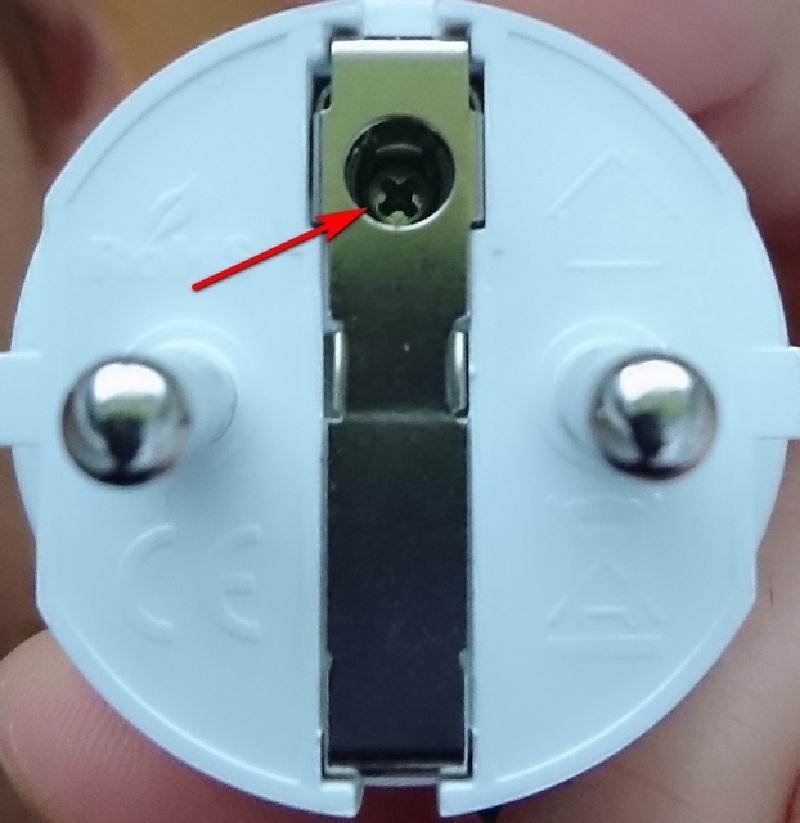
Make sure the plug has that screw on the bottom!
GPIO Pinout
| Pin | Function |
|---|---|
| GPIO00 | Led1i |
| GPIO01 | None |
| GPIO02 | LedLinki |
| GPIO03 | None |
| GPIO04 | HLWBL CF1 |
| GPIO05 | BL0937 CF |
| GPIO09 | None |
| GPIO10 | None |
| GPIO12 | HLWBL SELi |
| GPIO13 | Button1 |
| GPIO14 | None |
| GPIO15 | Relay1 |
| GPIO16 | None |
Basic Configuration
substitutions:
  devicename: "gosund_sp111"
  upper_devicename: "Gosund SP111"
  # Higher value gives lower watt readout
  current_res: "0.00280"
  # Lower value gives lower voltage readout. In my case of about 15 of those devices this value is closest to my voltage meter
  voltage_div: "648"
esphome:
  name: $devicename
  platform: ESP8266
  board: esp8285
# This allows the device to restore the last saved relay state, either "ON" or "OFF" for the switch later in this config
  esp8266_restore_from_flash: true
preferences:
  flash_write_interval: 1min  # set to 5min to prevent wearing out the onboard flash module too quickly

# Enable logging
logger:
  baud_rate: 0

# Enable Home Assistant API
api:
  encryption:
    key: "REDACTED"
ota:
  password: "REDACTED"
wifi:
  ssid: !secret wifi_ssid
  password: !secret wifi_password
  ap:
captive_portal:
# see: https://esphome.io/components/time.html
time:
  - platform: homeassistant
    id: homeassistant_time
# Enable Web server
web_server:
  port: 80
text_sensor:
  - platform: version
    name: "${devicename} - Version"
    icon: mdi:cube-outline
binary_sensor:
  - platform: status
    name: "${devicename} - Status"
    device_class: connectivity
  # toggle relay on/off
  - platform: gpio
    pin:
      number: GPIO13
      mode: INPUT_PULLUP
      inverted: True
    id: "${devicename}_button_state"
    on_press:
      - switch.toggle: button_switch
sensor:
  - platform: wifi_signal
    name: "${devicename} - Wifi Signal"
    update_interval: 60s
    icon: mdi:wifi
  - platform: uptime
    name: "${devicename} - Uptime"
    update_interval: 60s
    icon: mdi:clock-outline
  - platform: total_daily_energy
    name: "${devicename} - Todays Usage"
    power_id: "power_wattage"
    filters:
      # Multiplication factor from W to kW is 0.001
      - multiply: 0.001
    unit_of_measurement: kWh
    icon: mdi:calendar-clock
  - platform: adc
    pin: VCC
    name: "${devicename} - VCC Volt"
    icon: mdi:flash-outline
  - platform: hlw8012
    sel_pin:
      number: GPIO12
      inverted: True
    cf_pin: GPIO05
    cf1_pin: GPIO04
    change_mode_every: 4
    current_resistor: ${current_res}
    voltage_divider: ${voltage_div}
    update_interval: 3s
    current:
      name: "${devicename} - Ampere"
      unit_of_measurement: A
      accuracy_decimals: 3
      icon: mdi:current-ac
    voltage:
      name: "${devicename} - Volt"
      unit_of_measurement: V
      accuracy_decimals: 1
      icon: mdi:flash-outline
    power:
      name: "${devicename} - Watt"
      unit_of_measurement: W
      id: "power_wattage"
      icon: mdi:gauge
status_led:
  pin:
    number: GPIO02
    inverted: True
  id: led_blue
output:
  - platform: gpio
    pin: GPIO00
    inverted: true
    id: led_red
switch:
  - platform: template
    name: "${devicename} - Switch"
    icon: mdi:power
    optimistic: true
# This is where the "restore_from_flash" comes in. I set it to try to restore from flash and, if that fails, set it to ON
    restore_mode: RESTORE_DEFAULT_ON
    lambda: 'return id(relay).state;'
    id: button_switch
    turn_on_action:
      - switch.turn_on: relay
      - output.turn_on: led_red
    turn_off_action:
      - switch.turn_off: relay
      - output.turn_off: led_red
  - platform: gpio
    pin: GPIO15
    id: relay