Ningbo Fuda 5250B Dehumidifier
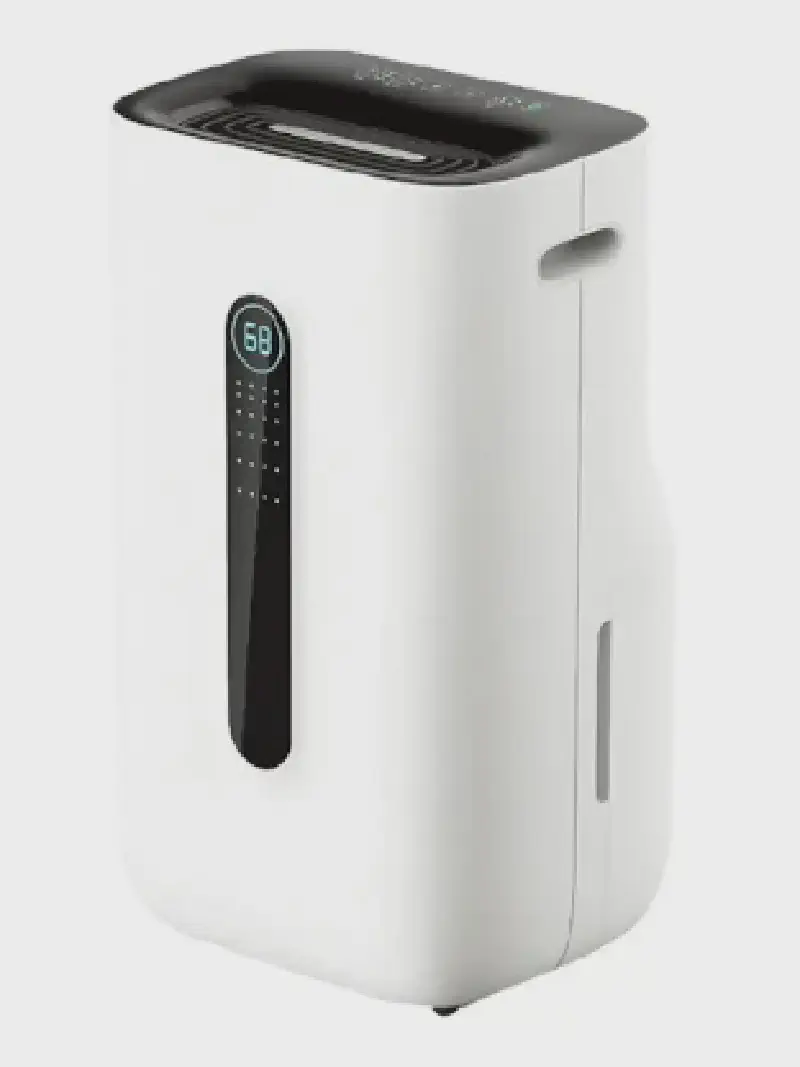
Overview
Ningbo Fuda Intelligent Technology is a company manufacturing a number of devices such as dehumidifiers and air conditioning units. These are typically white-labeled, and come under a number of brand names such as Rohnson, Nedis, Kayami, Cling etc. Some of these dehumidifiers are WiFi-enabled, by employing a Tuya module, allowing them to be fully controlled over WiFi, typically using the vendor’s smartphone app, or the Tuya Smart/Smart Life applications. Unfortunately, as of October 2023, ESPHome does not include a Humidifier/Hygrostat component to map to Home Assistant’s Humidifier integration (see esphome/feature-requests#1859). Until such support is added, the dehumidifier can be exposed as a series of switches, sensors and selects, for each of the functions of the device’s control panel.
Flashing
Over-the-air
It is often possible to use tuya-convert to flash the module over-the-air. Note that this applies to ESP8266-based modules; if your model shipped with a BK72xx-based module, other methods such as tuya-cloudcutter can be used. Both of these tools rely on exploiting vulnerabilities in the stock Tuya firmware, which may be patched in newer versions, so this may or may not work with your device. It is generally advisable to not install firmware updates through the vendor’s smartphone application as this may patch any vulnerabilities that exist in the shipped software.
Over serial
If OTA fails, it is possible to flash the module through the serial port pins,
using esptool, or, in case your model
shipped with a BK72xx, using
ltchiptool.
The dehumidifier can be easily disassembled using a Philips screwdriver. The
Tuya module can be found on a separate daughterboard, connected using a JST
connector to the mainboard, which provides the board with +5V, GND, as well
as RX/TX pins for the UART connecting to the main MCU. The daughterboard
includes a voltage regulator and level shifters to convert between +5V and
+3.3V, that the Tuya module expects. Unfortunately, this is a different UART
than the one required for flashing the firmware. However, the daughterboard
helpfully contains debug pins next to the module:
| Pin | Connect to |
|---|---|
| UART 0 RX | Serial adapter TXD |
| IO1 | Serial adapter RXD |
| IO0 | Short to GND for flashing |
| GND | Serial adapter/Vcc GND |
Vcc needs to be provided separately, either +5V through the connector, or | |
+3.3V directly to the ESP8266. |
Board Configuration
The configuration below is for a Rohnson R-9820, model name FDD20-5250BWR5:
esp8266:
  board: esp_wroom_02
uart:
  rx_pin: GPIO13 # U1RX
  tx_pin: GPIO15 # U1TX
  baud_rate: 9600
tuya:
  on_datapoint_update:
    - sensor_datapoint: 11
      datapoint_type: bitmask
      then:
        - lambda: |-
            ESP_LOGD("main", "on_datapoint_update %s", format_hex_pretty(x).c_str());
            // only seen in the wild is decimal value 8, for Water Tank Full
            id(water_tank_full).publish_state((x >> 3) & 1);
binary_sensor:
  - platform: template
    id: water_tank_full
    name: "Water tank"
    device_class: problem
    icon: "mdi:water-alert"
  - platform: tuya
    name: "Unknown 101"
    sensor_datapoint: 101
    internal: true
  - platform: tuya
    name: "Unknown 105"
    sensor_datapoint: 105
    internal: true
switch:
  - platform: tuya
    name: "Power"
    switch_datapoint: 1
  - platform: tuya
    name: "Air clean"
    icon: "mdi:leaf"
    switch_datapoint: 5
  - platform: tuya
    name: "Child lock"
    icon: "mdi:lock"
    switch_datapoint: 7
  - platform: tuya
    name: "Sleep"
    icon: "mdi:sleep"
    switch_datapoint: 102
number:
  - platform: tuya
    name: "Target humidity"
    number_datapoint: 4
    unit_of_measurement: "%"
    device_class: "humidity"
    min_value: 30
    max_value: 80
    step: 5
sensor:
  - platform: tuya
    name: "Temperature"
    sensor_datapoint: 103
    unit_of_measurement: "°C"
    device_class: "temperature"
    accuracy_decimals: 0
  - platform: tuya
    name: "Humidity"
    sensor_datapoint: 104
    unit_of_measurement: "%"
    device_class: "humidity"
    accuracy_decimals: 0
select:
  - platform: tuya
    name: "Mode"
    icon: "mdi:cog"
    enum_datapoint: 2
    options:
      0: Regular
      1: Automatic
      2: Strong
      3: Clothes drying
  - platform: tuya
    name: "Fan speed"
    icon: "mdi:fan"
    enum_datapoint: 6
    options:
      0: Low
      1: High
#  - platform: tuya
#    name: "Unknown"
#    enum_datapoint: 12