Tuya 2 Gang Switch Socket
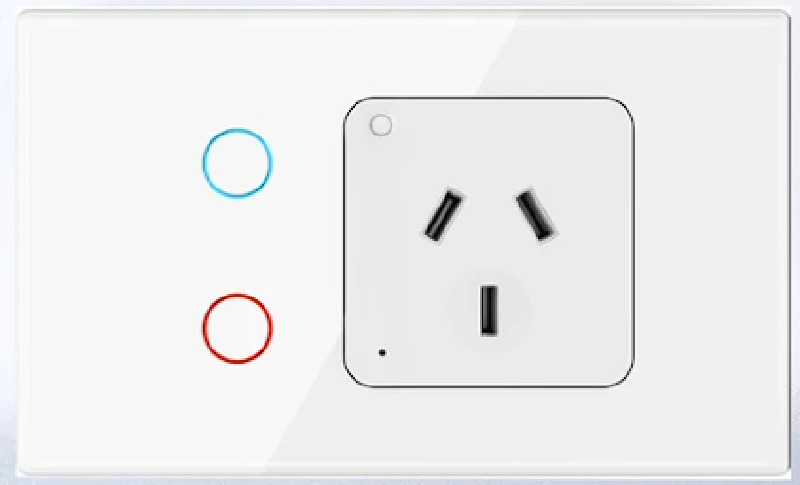
General Notes
A smart GPO the contains 2 light switches. All three outputs are controllable. These devices are sold under many brands on Aliexpress.
GPIO Pinout
| Pin | Function |
|---|---|
| P0 | Bottom Button Blue LED (H) |
| P6 | Top Button Relay L2 (H) |
| P7 | Top Button Blue LED (H) |
| P8 | Top Button (L) |
| P9 | Status LED RED (H) |
| P10 | Bottom Button (L) |
| P11 | GPO Button (L) |
| P24 | Bottom Button Relay L1 (H) |
| P26 | GPO Relay (H) |
| The light output relays are connected to the RED button LED. | |
| You can turn the button LED purple by turning on the blue LED while the RED is on. |
Configuration
## -----------------------##

## Substitution Variables ##

## -----------------------##

substitutions:
  device_friendly_name: GPO Switch
  device_internal_name: GPO Switch

## --------------------##

## Board Configuration ##

## --------------------##

esphome:
  name: ${device_internal_name}
  friendly_name: ${device_friendly_name}
bk72xx:
  board: generic-bk7231t-qfn32-tuya

## ---------------- ##

##  Binary Sensors  ##

## ---------------- ##

binary_sensor:
# Top Button
  - platform: gpio
    id: button_1
    pin:
      number: P8
      inverted: true
      mode: INPUT_PULLUP
    on_press:
      then:
        - light.toggle: light1
    internal: True

# Bottom Button
  - platform: gpio
    id: button_2
    pin:
      number: P10
      inverted: true
      mode: INPUT_PULLUP
    on_press:
      then:
        - light.toggle: light2
    internal: True
# Button 3(GPO)
  - platform: gpio
    id: button_3
    pin:
      number: P11
      inverted: true
      mode: INPUT_PULLUP

## ---------------- ##

##      Switch      ##

## ---------------- ##

switch:
#GPO
  - platform: gpio
    pin: P26
    name: ${device_friendly_name}
    id: relay
    restore_mode: always on   # default when power is turned on
    icon: mdi:power-socket-au
#Button LED (RED)
  - platform: gpio
    id: Top_buttonLED
    pin:
      number: P7
  - platform: gpio
    id: Bottom_buttonLED
    pin:
      number: P0

## ---------------- ##

##      Relays      ##

## ---------------- ##

output:
# Relay L1
  - platform: gpio
    id: relay1
    pin: P6
# Relay L2
  - platform: gpio
    id: relay2
    pin: P24

## ------------ ##

##    Lights    ##

## ------------ ##

light:
# Light L1
  - platform: binary
    name: ${device_friendly_name}_1
    icon: ${device_icon}
    output: relay1
    id: light1
# Light L2
  - platform: binary
    name: ${device_friendly_name}_2
    icon: ${device_icon}
    output: relay2
    id: light2